
Java security update, November 2026: what players and server admins need to do now

Java security update, November 2026: what players and server admins need to do now
On 17 November 2026, OpenJDK published a security advisory. Minecraft Java Edition runs on Java, on your PC just as on every server. So this post has two parts: For players, who play Minecraft on their own computer, and For server admins, who rent a server or run their own.
As of 18 November 2026, not every vendor has patches yet. Oracle, Amazon Corretto and Azul Zulu have published patched builds. Eclipse Temurin has not, and most Minecraft hosts and Docker images build on it. Red Hat, Microsoft and the Linux distributions also ship on their own schedules. The official Minecraft launcher also still ships an old Java version. So if you can't find an update yet, it's probably not your fault. Check again over the next few days and use the interim measures further down until then.
What happened
The advisory fixes ten vulnerabilities in OpenJDK and one in OpenJFX. All of them are reachable over the network, without a login and without anyone having to click anything. The most severe is CVE-2026-114938 in the HotSpot compiler, rated 8.1 on CVSS. It affects Java 17, 21, 25 and 27. Its discoverers at Calif call it "Java4Shell": a crafted Base64 string makes Java's Base64 decoder write memory in the wrong place. According to Calif, this let them run their own code on Keycloak, Jira and Jenkins without logging in. No attacks in the wild are known so far.
This one bug sits in a code path for the AVX-512 instructions of newer processors. According to Calif it affects Intel Xeon from Ice Lake on (Sapphire, Emerald and Granite Rapids) and AMD EPYC and Ryzen from Zen 4 on. Those are exactly the CPUs in many current root servers. ARM servers are not affected by it. The other nine bugs don't depend on the CPU, so everyone needs to update.
According to the advisory, Java 25.0.5, 21.0.13, 17.0.21, 11.0.33, 8u512 and every older version are affected. Java 8 and 11 are not affected by the most severe bug, but by several of the others.
Nobody knows yet whether any of these bugs can be exploited through the Minecraft protocol. A Minecraft server does handle outside data all day, though: player packets, skins, plugin messages, web panels, database connections. So: update, don't wait.
All vulnerabilities at a glance
| CVE | Area | CVSS | Affected Java lines |
|---|---|---|---|
| CVE-2026-114938 | HotSpot compiler ("Java4Shell") | 8.1 | 17, 21, 25, 27 |
| CVE-2026-114939 | Kerberos (org.ietf.jgss) | 7.4 | 8, 11, 17, 21, 25, 27 |
| CVE-2026-114940 | TLS (javax.net.ssl) | 7.4 | 8, 11, 17, 21, 25, 27 |
| CVE-2026-114941 | HotSpot compiler | 7.0 | 21, 25, 27 |
| CVE-2026-114942 | Core libraries | 7.0 | 17, 21, 25, 27 |
| CVE-2026-114943 | HotSpot runtime | 6.5 | 8, 11, 17, 21, 25, 27 |
| CVE-2026-114944 | Management (java.lang.management) | 5.9 | 8, 11, 17, 21, 25, 27 |
| CVE-2026-114945 | Core libraries (java.lang) | 5.3 | 17, 21, 25, 27 |
| CVE-2026-114946 | HotSpot compiler | 4.8 | 8, 11, 17, 21, 25, 27 |
| CVE-2026-114947 | TLS (javax.net.ssl) | 3.7 | 25, 27 |
| CVE-2026-86144 | JavaFX WebView | 7.5 | JavaFX 21, 25, 27 |
JavaFX plays no part in Minecraft servers.
Who doesn't need to do anything
- Bedrock Edition (consoles, phones, the Windows app, Bedrock Dedicated Server): it isn't written in Java.
- Minecraft Realms as a server: Mojang runs it. The Minecraft on your PC that connects to it still runs on Java, though. The part for players covers that.
Everyone who plays Minecraft Java Edition or runs a Java server needs to act.
For players
The Minecraft on your PC runs on Java too, and it handles data from the servers you play on. Nobody knows whether any of these bugs can be exploited through Minecraft. According to heise, though, Java4Shell also hits Java programs on your own computer if they run on one of the affected processors.
The official launcher has no update yet
The Minecraft launcher installs its own Java and does not use whatever else you have installed on your PC. As of 18 November it ships these versions:
| Minecraft version | Java in the launcher | Released |
|---|---|---|
| 26.1 and newer | 25.0.1 | December 2025 |
| 1.20.5 to 1.21.11 | 21.0.7 | May 2025 |
| 1.18 to 1.20.4 | 17.0.15 | May 2025 |
| up to 1.16.5 | Java 8 | badly outdated |
All of them are older than the patched builds. You can't trigger an update in the launcher yourself; Mojang has to ship it. Until then, you can protect yourself against the most severe bug.
Is your processor affected?
Java4Shell only hits processors with certain AVX-512 instructions. In gaming PCs and laptops these are mainly:
- AMD Ryzen from Zen 4 on: desktop Ryzen of the 7000, 8000 and 9000 series, and many laptop Ryzen from 2023 on, such as Ryzen 7040, 8040 and Ryzen AI.
- Older Intel processors: 10th-generation laptop CPUs ending in "G" (for example i7-1065G7) and the 11th generation. From the 12th generation on, Intel switched AVX-512 off on Core processors.
- Not affected: Macs with Apple silicon (M series).
On Windows, Task Manager shows your processor under "Performance" → "CPU", top right. If you're unsure, set the option below anyway. It only turns off a Base64 optimisation and does no harm.
Protection in the official launcher
- Open the launcher and go to "Installations" at the top.
- Hover over your installation, click the three dots, then "Edit".
- Expand "More options".
- At the end of the JVM arguments field, separated by a space, add:
-XX:-UseBASE64Intrinsics - Save and restart Minecraft.
Repeat this for every installation, including Fabric, Forge or NeoForge profiles. Remove the argument again once Mojang ships new Java.
If you know your way around, you can instead point "Java executable" in the same window at a patched Java you installed yourself, such as Azul Zulu or Amazon Corretto. The Java line has to match the Minecraft version (see the table "Which Java version does my server need?" in the part for server admins; the client needs the same).
Other launchers
Prism Launcher, MultiMC, ATLauncher, the Modrinth App and CurseForge use either their own Java or the one you installed, depending on their settings. Check their Java settings: switch to a patched Java there, or add the JVM argument from above.
Until the updates arrive, also stick mainly to servers you know.
For server admins
This part is for everyone who runs a Minecraft server or proxy, whether rented from a host or on their own root server or VM.
Which Java version does my server need?
| Minecraft version | Java version | Is there a fix? |
|---|---|---|
| 26.1 and newer | Java 25 | Yes |
| 1.20.5 to 1.21.11 | Java 21 | Yes |
| 1.18 to 1.20.4 | Java 17 | Yes |
| 1.17.x | Java 16 | No, Java 16 no longer gets updates. Switch to Java 17; 1.17 runs on it. |
| up to 1.16.5 | Java 8 (often 11 works too) | Yes |
Proxies such as Velocity or BungeeCord run on Java as well and need the update just the same.
Which version is safe?
You want a build released after 17 November 2026 that is newer than the versions listed above. The numbers differ by vendor. As of 18 November:
| Vendor | Patched builds |
|---|---|
| Oracle | 17.0.21.1, 21.0.13.1, 25.0.5.1 |
| Amazon Corretto | 17.0.21.1.2, 21.0.13.1.2, 25.0.5.1.2 |
| Azul Zulu | 17.0.21.1, 21.0.13.1, 25.0.5.1 |
| Eclipse Temurin | none yet |
| Red Hat, Microsoft, Linux distributions | pending, own schedule |
Temurin, which most Minecraft hosts and Docker images build on, had no new build yet. Adoptium is working on it and aims for "as soon as possible". So when you update, check that the build really is new, not just that the package manager says "done".
To see your current version:
java -version
Important: a running server keeps using the Java it was started with. The update does nothing until you restart.
You rent from a host
With most Minecraft hosts you only pick a "Java image" or "Java version" in the panel. The host maintains the Java installation behind it. That leaves three things for you to do:
- Check which Java version is running. Most servers print it to the console on startup. Paper, for example, reports the Java version in its first lines.
- Ask your host whether and when the images will be updated. There is a template below.
- Restart after the update so your server actually uses the new Java. Some panels only pull a new image on the next start, or only after "reinstall". Ask what your host requires.
If your server still runs on Java 16 (Minecraft 1.17), switch to Java 17 in the panel.
Ticket or email template
Fill in the parts in square brackets and send the text to your host's support:
Subject: Java security update of 17 Nov 2026 for my Minecraft server

Hello,

On 17 November 2026, OpenJDK published a security advisory with ten
vulnerabilities, including CVE-2026-114938 (CVSS 8.1):
https://openjdk.org/groups/vulnerability/advisories/2026-11-17

Java 25.0.5, 21.0.13, 17.0.21, 11.0.33, 8u512 and older versions are
affected. According to its startup log, my server [server name / server ID]
runs on Java [version from the console].

I have the following questions:

1. When will you provide updated Java versions or images that fix these
   vulnerabilities?
2. Do I need to do anything afterwards (restart, select the image again,
   reinstall) for my server to use the new version?
3. Is there an interim measure you recommend until then?

Thank you and best regards
[Name]
You run a root server or VM
Here it's on you. The steps are always the same: find out which Java is running, update it, restart, check.
1. Find every Java installation
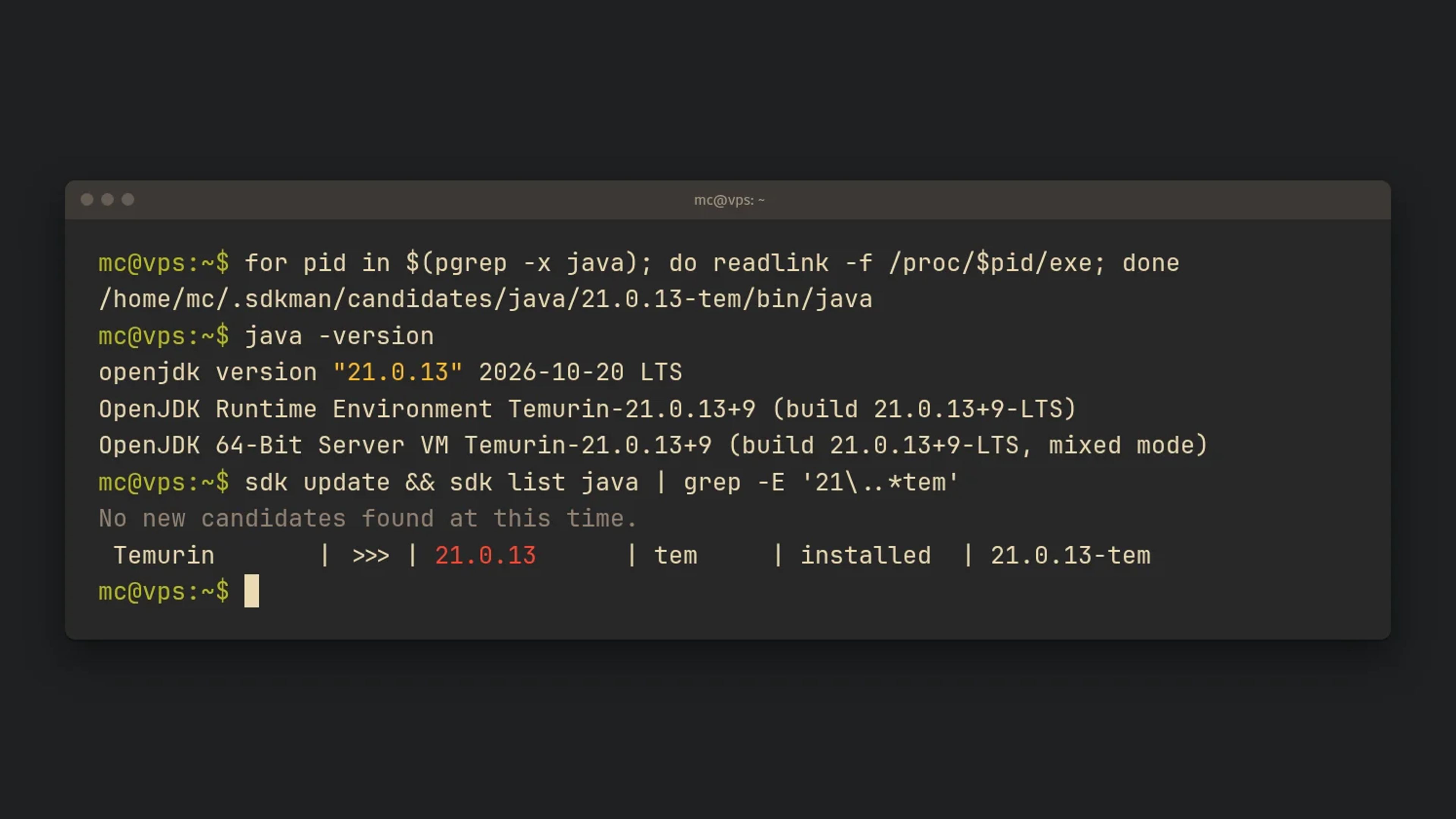
Many servers have more than one Java: a system package, an unpacked archive under /opt, and one from SDKMAN. These commands show which Java your running processes really use and what is installed overall:
# Which Java does each running Java process use?
for pid in $(pgrep -x java); do
  echo "PID $pid: $(readlink -f /proc/$pid/exe)"
done

# Every Java binary installed on the system
sudo find / -xdev -type f -path '*/bin/java' 2>/dev/null
Run each binary you find with -version, for example /opt/java/bin/java -version.
2a. With SDKMAN
SDKMAN installs Java per user under ~/.sdkman. Log in as the user your Minecraft server runs as.
# Refresh the candidate list
sdk selfupdate
sdk update

# Look for new builds of your line, e.g. Java 25 from Temurin
sdk list java | grep -E '25\..*tem'

# Install the new build and make it the default
# (take the identifier from the list)
sdk install java <identifier>
sdk default java <identifier>

# Check
java -version
If your server starts from a systemd unit or a script, check which path it uses:
~/.sdkman/candidates/java/current/bin/javafollows the default you set withsdk default.- A fixed path such as
~/.sdkman/candidates/java/21.0.13-tem/bin/javastays on the old build. Put in the new path or switch tocurrent.
Remove the old build only once the server runs cleanly on the new one: sdk uninstall java <old-identifier>.
2b. Without SDKMAN
Debian and Ubuntu (openjdk-* packages, or Temurin from the Adoptium repository):
sudo apt update
apt list --upgradable 2>/dev/null | grep -Ei 'jdk|jre|temurin'
sudo apt upgrade
Fedora, RHEL, Rocky, Alma:
sudo dnf check-update --refresh | grep -Ei 'jdk|jre|temurin'
sudo dnf upgrade
Arch Linux:
sudo pacman -Syu
Distributions ship security updates under their own package version, often a few days after the advisory. If no update shows up yet, check your distribution's security tracker.
Java unpacked by hand (for example a Temurin archive under /opt): download the new build once it's out, unpack it next to the old one and point a fixed path at it. Future updates then only change that link:
sudo tar -xzf OpenJDK25U-jdk_x64_linux_hotspot_<version>.tar.gz -C /opt
sudo ln -sfn /opt/jdk-<version> /opt/java-25
/opt/java-25/bin/java -version
Your start script then always calls /opt/java-25/bin/java.
Docker and Pterodactyl/Pelican: the Java images (such as Pterodactyl's "yolks") are usually built on Temurin. Once new images are out, pull them on every node and recreate the containers. A plain restart is not enough if the image wasn't pulled again:
docker compose pull
docker compose up -d
3. Restart and check
Restart every Minecraft server and every proxy. Then run the loop from step 1 again and check the version for each process. You're done only when every one of them shows the new build.
Interim measure while no build is available
If there is no patch for your Java yet, you can at least defuse Java4Shell. First check whether your CPU has the affected instruction set:
grep -om1 -E 'avx512_?vbmi' /proc/cpuinfo
If the command prints nothing, your server is not vulnerable to Java4Shell. You still need the update for the other bugs.
If it prints avx512vbmi or avx512_vbmi, either of these JVM flags switches off the affected code path:
# Turns off only the Base64 optimisation (the narrower option)
java -XX:-UseBASE64Intrinsics -jar server.jar

# Limits Java to AVX2; broader, and may cost more performance
java -XX:UseAVX=2 -jar server.jar
jcmd <PID> VM.flags -all | grep -E 'UseBASE64Intrinsics|UseAVX' shows whether the flag is active in the running server. Only set UseAVX on x86 servers: an ARM JVM doesn't know the flag and won't start at all.
Neither is an official recommendation from OpenJDK; both are stopgaps from security researchers' analyses. They only help against CVE-2026-114938, not the other nine bugs. Remove the flag again once a patched build is running.
In short
- Bedrock: nothing to do. Mojang looks after Realms servers.
- Players: check your processor, add
-XX:-UseBASE64Intrinsicsin the launcher, and remove it again once Mojang ships new Java. - Rented server: check the Java version in the startup log, ask your host, restart after the update.
- Your own server: find every Java installation, update through SDKMAN, the package manager or a new archive, restart, check the version.
- Move Java 16 to Java 17, and likewise any other line without support.
If you have questions or get stuck, find us on Discord.
Sources and further reading
Official:
- OpenJDK Vulnerability Advisory of 17 November 2026 with every CVE number
- CISA: Critical Java Vulnerability Requires Immediate Patching
In English:
- heise online: Java4Shell: Dangerous Java vulnerability
- The Hacker News: Java4Shell Flaw Enables Pre-Auth RCE in Jira, Jenkins, Keycloak and More
- Datadog Security Labs: Java4Shell, Remote Code Execution in OpenJDK, with details on CPUs and stopgaps
In German: