
Resilience in Detail: PriorityClasses, PDBs and (Anti-)Affinities in Our Kubernetes Cluster

Phillipp Glanz
Software Lead & Backend
Resilience in Detail: PriorityClasses, PDBs and (Anti-)Affinities in Our Kubernetes Cluster
This edition is for everyone who wants to climb into the engine room with me. I walk through the concrete steps I used to harden our GitOps-managed Kubernetes cluster against node failures, drains and resource pressure – including the spots where I bruised my knuckles.
Deep-dive edition. The non-technical short version with everyday images lives in the Light Edition. Every change here lives in a Flux-managed Git repository – each line below is a real commit.
Starting point
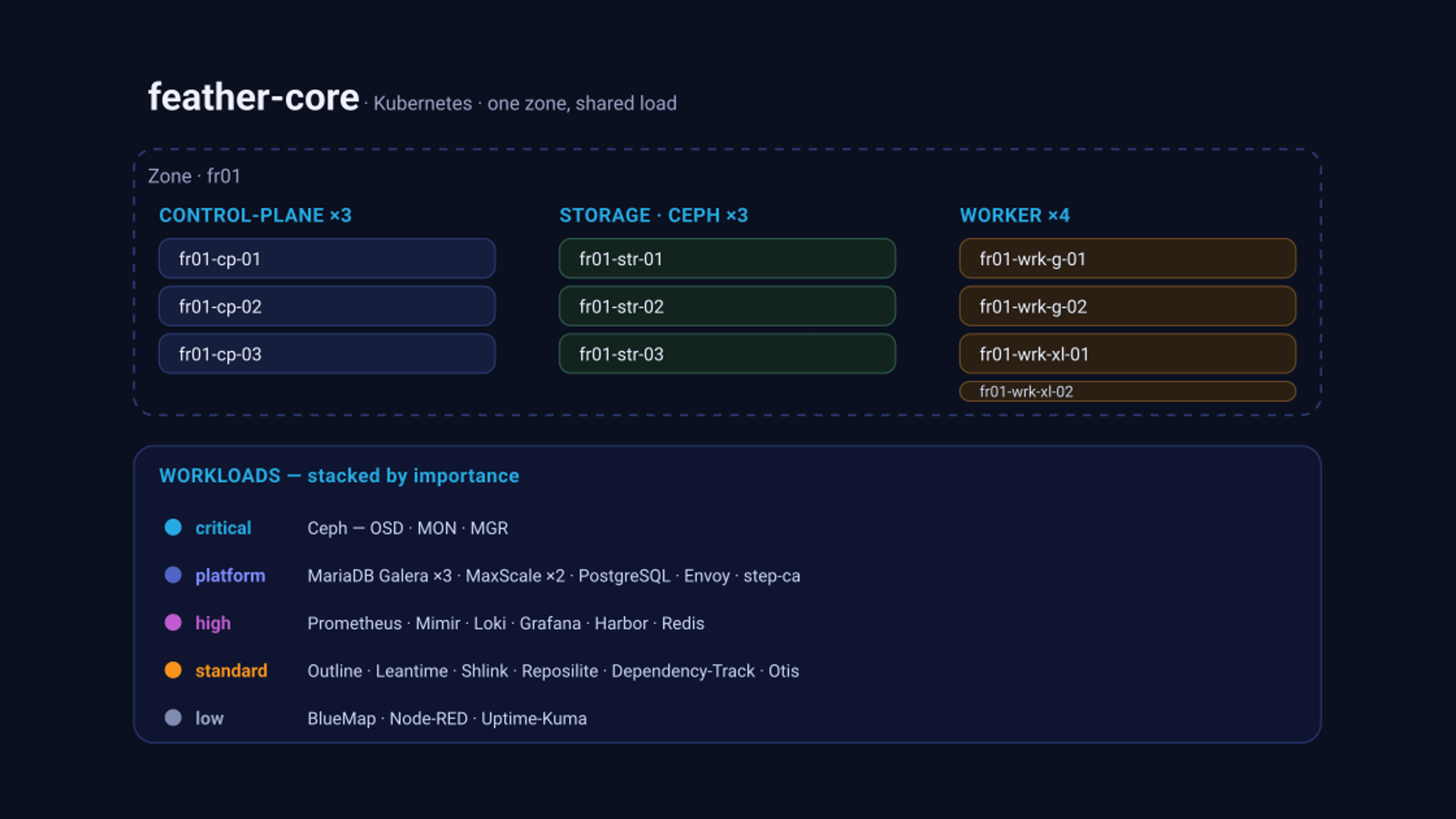
Our feather-core cluster runs in a single zone (fr01) with separated node roles: control-plane, dedicated storage nodes (Ceph), and workers in two sizes. On top sits the full stack.
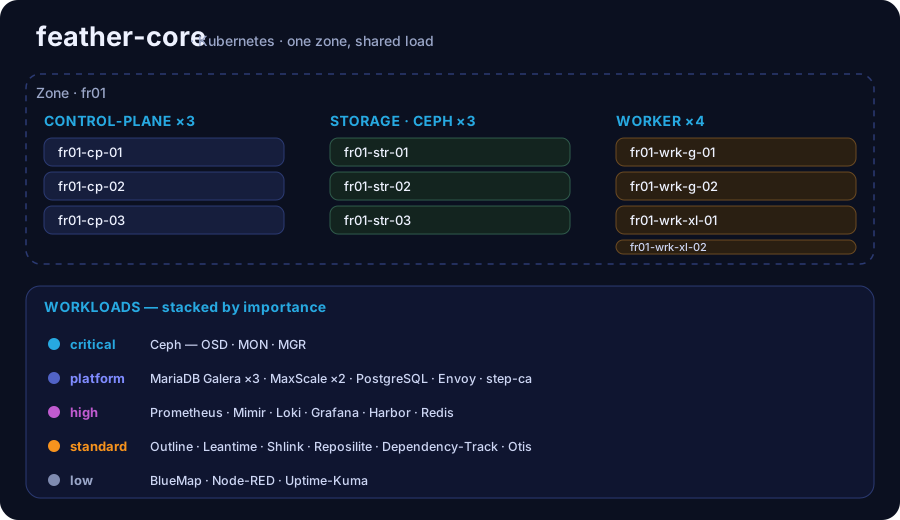 The cluster at a glance: three control-plane nodes, three Ceph storage nodes, four workers – and underneath, stacked by importance, what actually runs on it.
"It runs" was never my problem. My question was: what happens on the first real node failure? I went looking for the answer along three hardening pillars.
Pillar 1: Resources – no more BestEffort
Before you can talk about scheduling guarantees, pods need requests and limits in the first place. Pods without them land in the BestEffort QoS class and are the first the kubelet kills under node memory pressure – no matter how critical they are.
Case in point. Our PostgreSQL cluster (CloudNativePG) ran for a while with no resource specs at all – i.e.
BestEffort. The very pod you least want touched under memory pressure would have been the first to be evicted. Only explicitrequests/limitslifted it into theGuaranteedclass (commitfix(cnpg): set resources on postgres cluster (was BestEffort)).
I went through the stack methodically and eliminated the last BestEffort workloads: Postgres, the MariaDB/MaxScale metrics exporters, MetalLB, the CNPG Barman plugin sidecar, Mimir, Loki, the Envoy data-plane and several more got explicit requests/limits. Where only memory limits existed, I added CPU limits – set generously above observed load to avoid throttling:
resources:
  requests:
    cpu: "2"
    memory: 8Gi
  limits:
    memory: 8Gi   # memory limit == request: Guaranteed QoS, no OOM lottery
This pillar is unspectacular but a prerequisite for everything else: only with clean resource specs do QoS class and priority become meaningful to the scheduler at all.
Pillar 2: PodDisruptionBudgets against the "all-at-once" effect
A node drain (update, maintenance) evicts every pod on that node. Without a guardrail, this can hit all replicas of a multi-replica service simultaneously – a brief total outage. A PodDisruptionBudget with maxUnavailable: 1 forbids that:
apiVersion: policy/v1
kind: PodDisruptionBudget
metadata:
  name: bluemap
  namespace: bluemap
spec:
  maxUnavailable: 1
  selector:
    matchLabels:
      app.kubernetes.io/instance: bluemap
      app.kubernetes.io/name: bluemap
I added PDBs like this for every multi-replica service: BlueMap (3), Dependency-Track frontend (3), Harbor components core/registry/jobservice/portal (2 each), Reposilite (3) and the Prometheus agent (2). I deliberately gave single-replica workloads no PDB – a maxUnavailable: 1 on a single replica would block node drains entirely. Because the underlying Helm charts often offer no native PDB, these live as standalone manifests next to the releases.
Case in point. Draining
fr01-wrk-xl-01for maintenance could, without a PDB, have moved several BlueMap replicas at once – the map viewer gone for a beat. WithmaxUnavailable: 1, Kubernetes moves the replicas one after another; at least two stay reachable throughout.
Pillar 3: A five-tier PriorityClass scheme
When memory runs short cluster-wide, pod priority (PriorityClass & preemption) decides who stays and who yields. I defined five tiers below the built-in system-* classes (system-cluster-critical/system-node-critical):
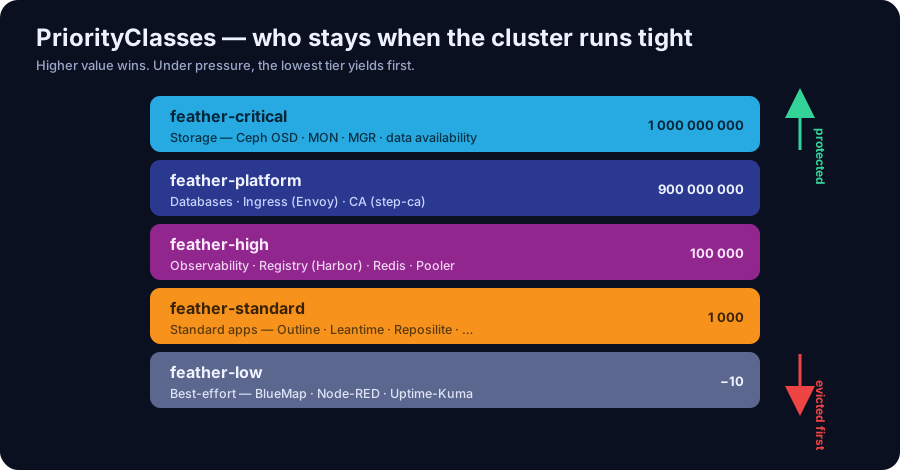 Higher value wins. Storage sits at the top, the best-effort apps at the very bottom – those are evicted first under pressure.
Storage and databases are thereby structurally protected; expendable apps step back first. So much for the theory – now to the two spots where it hurt.
Case in point. When a worker comes under memory pressure, the kubelet evicts
feather-lowfirst – BlueMap, Node-RED, Uptime-Kuma. The Galera database (feather-platform) and Ceph (feather-critical) are left untouched. Before, that order was left to chance: it could just as easily have hit the database.
Pitfall 1: the silent no-op
Assignment went well – until it didn't. For some of our charts (Outline, Leantime, Shlink, Reposilite, Otis, BlueMap) I dutifully set priorityClassName as a Helm value – and nothing happened. Those charts simply don't reference .Values.priorityClassName; the value was a silent no-op. No error, no warning – just inert.
The fix was HelmRelease postRenderers patching the rendered Deployment directly:
postRenderers:
  - kustomize:
      patches:
        - target:
            kind: Deployment
            name: grafana
          patch: |
            - op: add
              path: /spec/template/spec/priorityClassName
              value: feather-high
Lesson: a key set in values only counts if the template actually consumes it. When in doubt, patch the rendered object.
Pitfall 2: webhook-immutable fields that block the reconcile
The real teacher was MaxScale, our MariaDB proxy. I wanted to give it feather-platform – just like Postgres and Envoy in the same commit. The MariaDB operator's admission webhook rejected the patch: spec.priorityClassName is immutable on an existing MaxScale CR.
Worse: the rejection at dry-run already made the entire configs Kustomization in Flux fail – and thereby blocked the successful priority changes to Postgres and Envoy in that same reconcile. I had to revert the MaxScale field to get the rest through:
revert(maxscale): drop priorityClassName (immutable, blocked configs reconcile)
Lesson: in GitOps a single immutable field is not a local error – it can stall an entire Kustomization and drag uninvolved changes down with it.
Affinities: topology as a resilience lever
Priority and PDBs govern the whether; affinities govern the where.
Node affinity (zone pinning): all PVC-backed workloads belong on fr01 nodes, where the ceph-rbd-fr01 storage is local – otherwise I/O performance suffers. Using the well-known label topology.kubernetes.io/zone I hard-anchored this for Harbor-Trivy, step-ca and MariaDB, for example:
nodeAffinity:
  requiredDuringSchedulingIgnoredDuringExecution:
    nodeSelectorTerms:
      - matchExpressions:
          - key: topology.kubernetes.io/zone
            operator: In
            values: ["fr01"]
Case in point. step-ca and Harbor-Trivy depend on
ceph-rbd-fr01PVCs. Without zone pinning the scheduler could have placed them on a node with no local storage – with noticeably slower I/O over the network. The hardrequiredDuringSchedulingon thefr01zone prevents exactly that (commitfeat(affinity): enforce fr01 zone for harbor-trivy and step-ca).
Pod anti-affinity (spreading): multiple replicas on the same node aren't real redundancy. For BlueMap, Reposilite, Shlink and the Dependency-Track frontend I added a soft (preferred) anti-affinity so replicas prefer different nodes but don't block scheduling when nodes are scarce:
podAntiAffinity:
  preferredDuringSchedulingIgnoredDuringExecution:
    - weight: 100
      podAffinityTerm:
        labelSelector:
          matchLabels:
            app.kubernetes.io/name: bluemap
        topologyKey: kubernetes.io/hostname
Pitfall 3: the hard anti-affinity that left a pod Pending
Here the MaxScale saga reaches its climax. I wanted the 2 MaxScale replicas spread across nodes and enabled the operator option antiAffinityEnabled: true. What I missed: that option generates a hard (required) anti-affinity against both instances – MaxScale and MariaDB.
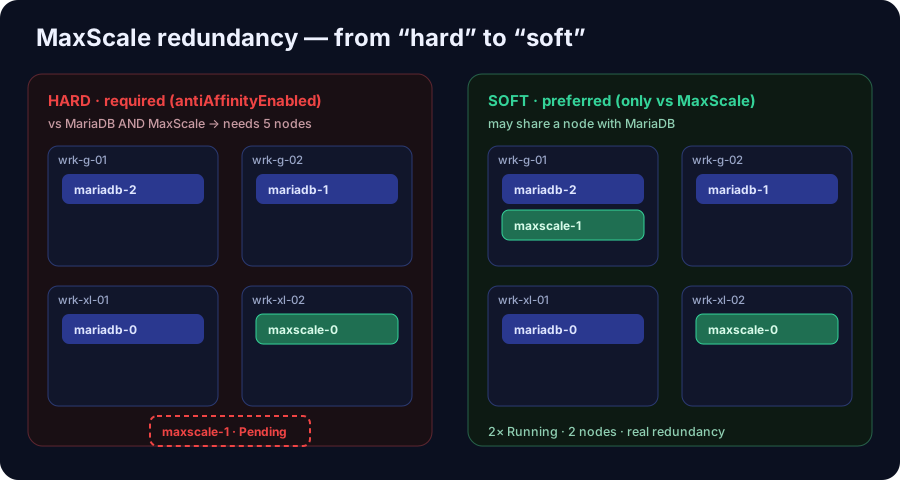 Left, the hard rule: 4 DB-eligible workers, 3 already occupied by MariaDB – the second MaxScale pod finds no spot and stays Pending. Right, the soft rule: two MaxScale pods, two nodes, real redundancy.
The math didn't work out: 4 DB-eligible workers, 3 MariaDB pods already on them. A hard rule forcing 3 MariaDB and 2 MaxScale pods onto their own nodes needs 5 nodes. The second MaxScale pod found no spot and stayed Pending – which once again stalled the configs Kustomization. As an immediate measure, I scaled non-disruptively to 1 replica.
The clean end state required two insights:
- Soft instead of hard, and only against itself. The replicas should keep their distance from each other (preferred) but may share a node with MariaDB – there simply aren't enough nodes to separate both fully.
antiAffinityEnabledis immutable. Switching from the hard to the soft rule – like restoring the priority – couldn't be applied to the existing CR via update. The only way through was to recreate the CR.
The final spec for MaxScale:
spec:
  replicas: 2
  priorityClassName: feather-platform
  affinity:
    podAntiAffinity:
      preferredDuringSchedulingIgnoredDuringExecution:
        - weight: 100
          podAffinityTerm:
            labelSelector:
              matchExpressions:
                - key: app.kubernetes.io/instance
                  operator: In
                  values: ["maxscale-galera"]
            topologyKey: kubernetes.io/hostname
Because Flux would never have pushed the immutable update through on its own, recreating the CR was the decisive step:
kubectl delete maxscale maxscale-galera -n mariadb-galera
# Flux/operator rebuild the CR from the updated manifest
Result: two MaxScale pods, 1/1 Running, on two different nodes, the LoadBalancer VIPs (rw-router and GUI) back online – genuine node redundancy instead of a single point of failure. The only cost was a brief VIP blip of ~30–60 seconds during the recreation.
Impact
- Graceful degradation instead of a domino effect. A node failure or drain no longer takes a service fully offline; PDBs and spreading absorb the hit.
- Structured self-protection. Under resource pressure,
feather-low(BlueMap, Node-RED, Uptime-Kuma) yields first; storage and databases are safeguarded byfeather-critical/feather-platform. - Real redundancy at the hottest spot. The database proxy – through which every DB request flows – now runs doubled and node-distributed.
- GitOps discipline as a safety net. Every one of these changes is a reviewed commit; the reconcile immediately surfaces when something like an immutable field gets in the way – sometimes painful, but always transparent.
The biggest lesson was less a single setting than a pattern: written down is not applied. A value nobody reads; a field that can't change; a hard rule without enough nodes – the trouble rarely sits in the idea, almost always in the interplay. That is exactly what our cluster is now a good deal more robust against.
Sources & Further Reading
So the knowledge is traceable – the official Kubernetes docs for each building block:
- Resources & QoS: Managing resources for containers · Quality-of-Service classes · Node-pressure eviction
- PodDisruptionBudgets: Disruptions (concept) · Configure a PDB · Safely drain a node
- Priority: Pod Priority & Preemption
- Placement: Assigning Pods to Nodes (affinity & anti-affinity) · Well-known labels (
topology.kubernetes.io/zone) - Webhook immutability: Admission controllers (validating webhooks) – why the MaxScale operator only accepts some fields on a fresh CR.
Become Part of Our Journey
At OneLiteFeather, we value a relaxed working atmosphere and embody the flair of creative freedom coupled with structured organization. We operate under the Kanban principle, which allows us to work in a stress-free environment without rigid deadlines. Our focus lies on active communication and collective progress. If you have experience in the areas of Moderation, Community Management, Development, or Concept Creation and wish to engage in a community that values personal growth and teamwork, then you are exactly right with us. References are welcome and help us gain a better understanding of your skills and experiences.
We are excited to hear from you and realize exciting projects together. You can reach me, themeinerlp, directly on Discord, or you can get in touch via our Discord server, which you can find at 1lf.link/discord. There, you can open a ticket to apply. Alternatively, you can also contact OneLiteFeather directly via Discord. Let’s chat about your ideas and how you can contribute to the OneLiteFeather community. Together, we can explore the digital world, expand our knowledge, and build a positive and supportive community.
Should any uncertainties arise, feel free to ask us. We are here to answer all your questions and are looking forward to learning more about you and your interests!