
End portal in the overworld
A planned end portal in the overworld by Svenko1: a portal platform with light pillars in the middle of a crater. Schematic attached – nothing has been built yet.
Goal
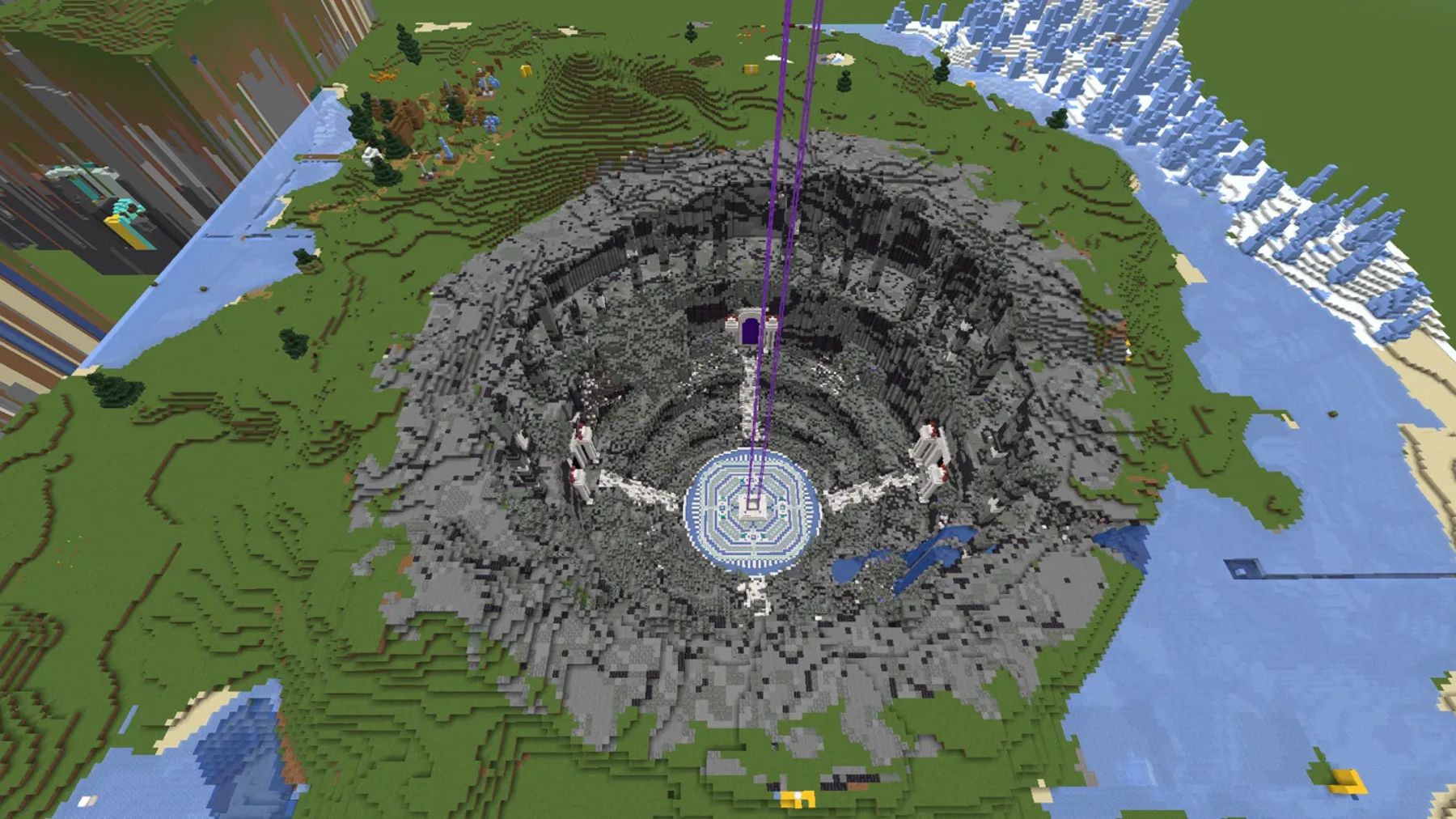
An end portal as a structure in the overworld: portal platform, light pillars and a patterned forecourt at the centre of a crater.
Current state
Schematic and screenshots of the design exist, the location is not fixed yet – nothing has been built.
- Builders involved
- Svenko1 (Svenko1)
- Last updated
What is it?
Svenko1 is planning an end portal in the overworld: a portal platform with light pillars, set into a large crater. Nothing has been built yet — what exists is the schematic without surroundings (173 × 136 × 173 blocks) and the screenshots of the design.
What the pictures show
The cover image shows the crater from above, with the platform at its centre. The close-ups of the forecourt show floor patterns in white and turquoise, benches and the steps up to the platform. Several purple light pillars rise above the platform and are also clearly visible from a bird's-eye view.
How can you help?
Once the location is fixed, help with farming materials is welcome. Get in touch with Svenko1.
Image gallery
The crater from above – the platform sits at the centre From the forecourt: floor patterns, benches and the steps up to the platform Wide angle across the platform and the rock walls A view onto the platform framed by blocks From above: concentric patterns around the platform Aerial view with the light beams
Litematica schematics
- Download
End Portal ohne Umgebung
.litematicapprox. 590 KB
Point / setup guide
No location fixed yet, so no origin is set. Agree on a site before pasting.
Load the schematic with the Litematica mod in Minecraft to rebuild the project block by block.
Set up & use Litematica
Quick-start and FAQ around the Litematica mod so you can use the schematics from this overview right away.
What is Litematica?
Litematica is a Minecraft client mod (Fabric) that displays schematic files (.litematic) as a hologram in-game. You can rebuild any project 1:1 without touching the server — other players don't see your hologram.
How do I install the mod?
You need the Fabric loader for your Minecraft version and drop the Litematica JAR (plus its dependency MaLiLib) into the mods/ folder. After launch, check the mods menu to confirm both are active.
How do I load a schematic?
Save the .litematic file in .minecraft/schematics/. In-game, open the Litematica menu (default: M), pick 'Load schematic' and set the position via 'Schematic placement'.
What's the point / setup guide for?
Each schematic ships with a recommended origin and facing direction. Following them places the hologram in the intended spot and aligns it with neighbouring builds.
Which Litematica version do I need?
Each schematic lists the recommended Litematica version (and matching Minecraft version) right next to the file. Stick to that combination — older or newer Litematica releases can serialise blocks differently, which shifts or breaks the hologram.
Can I use auto-place / easy place?
No. OneLiteFeather forbids any kind of auto-place — that includes Easy Place, Place Holder and similar features that set blocks automatically. Violations lead to a permanent ban. Litematica is only allowed as a visual blueprint; you place every block yourself.
Can I use the schematics on my own world?
Yes, of course. The schematics in this overview are free to use privately and on your own servers. Please credit the original builders when sharing publicly.